Advanced Settings
Advanced Settings holds the options that change how PRIORITYwave drives the
traffic cabinet. Open it from Settings > Advanced Settings. Both settings
are saved on the receiver and carry over through firmware updates.
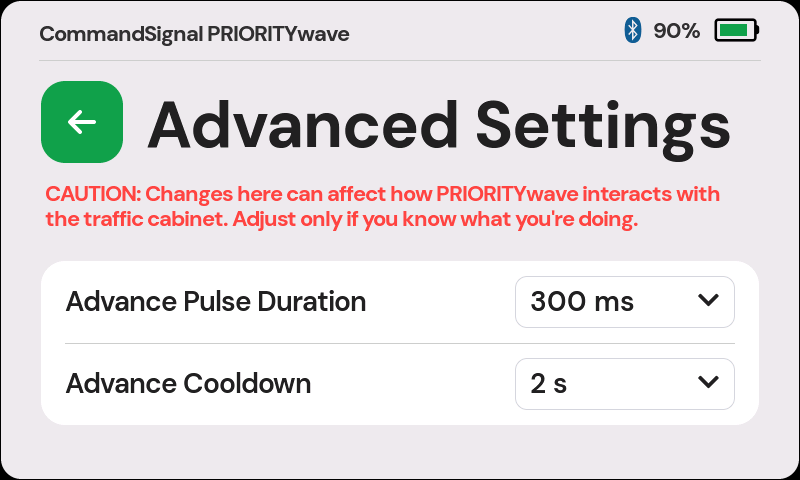
Advance Pulse Duration
How long the advance contact is held per command: 200 ms, 300 ms (default), 400 ms, 600 ms, or 800 ms.
The default works with virtually all cabinets. Change the pulse duration only if you know your cabinet needs a specific value.
Advance Cooldown
How long the receiver waits after an advance before it accepts the next one: 0.5 s, 1 s, 2 s (default), 3 s, 4 s, 5 s, 6 s, or 10 s. The cooldown applies to every source — the touchscreen, remotes, and the app — so no combination of presses or operators can get around it.
The cooldown protects the yellow and red clearance. Under manual control, a cabinet doesn't always enforce its own clearance timing, so an advance that arrives too soon could cut the yellow or the red clearance short — which the cabinet's malfunction management unit (MMU) can treat as a fault and answer by putting the intersection into flash. With the cooldown set at or above the intersection's yellow plus red clearance, the next advance can't arrive until both have run their full length.
- Picking a value: set it at or above the longest yellow plus red clearance at the intersections you work.
- Pressing during the cooldown: the advance doesn't fire. The remote's ring strobes as a failed press, and the app shows Advance Failed with "Device is busy." The touchscreen doesn't flag it — you just won't hear the click.
- Updated from older firmware? Receivers that had the old fixed cooldown (750 ms) move to the 2-second default after updating.
- Row grayed out with a fixed value (such as
750 ms)? The receiver's control board is on older firmware and needs a one-time service update before the cooldown can be changed — see Service Update Required.