Garmin Control
Wear a Garmin? The CommandSignal Connect IQ app works on a wide range of Garmin watches — fēnix, Forerunner, Instinct, epix, Venu, vívoactive, and more. Like the other watch apps, it relays commands through your phone: the watch talks to Garmin Connect, Garmin Connect talks to CommandSignal, and CommandSignal talks to the receiver.
You'll need: a supported Garmin watch, Garmin Connect Mobile on your phone, and the CommandSignal app connected to a receiver.
Install the Watch App
- On your phone, open the Connect IQ Store (part of Garmin Connect Mobile).
- Open the CommandSignal listing, or search for CommandSignal.
- Install it to your watch.
Link the Watch (iPhone)
One quick authorization connects your watch to the iPhone app — no account, no codes to type:
- In the CommandSignal iPhone app, connect to your receiver.
- Tap Connect Garmin Watch — it's on the "Use Your Garmin Watch" card on
the Control screen, and also under
Settings> Garmin Watch. - Garmin Connect opens; pick your watch.
- You're bounced back to CommandSignal, linked. The Control screen shows
Garmin Device Connectedwhenever the watch is reachable.
The Garmin option only appears when Garmin Connect Mobile is installed and the phone is connected to a receiver — if you don't see it, check those two things.
Send an Advance
Open CommandSignal from the watch's app list. You'll see receiver battery and signal, an advance control, and the time since the last advance. How you trigger it depends on the watch:
- Touchscreen watches — tap the ADVANCE button.
- Button watches — press Start (the watch says "Press Start to Advance").
- Instinct watches — press GPS (the watch says "Press GPS to Advance").
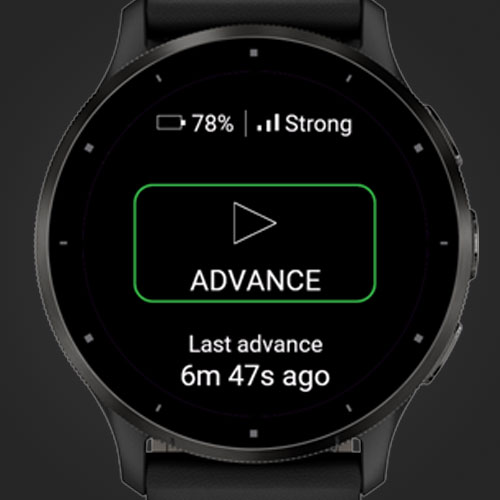
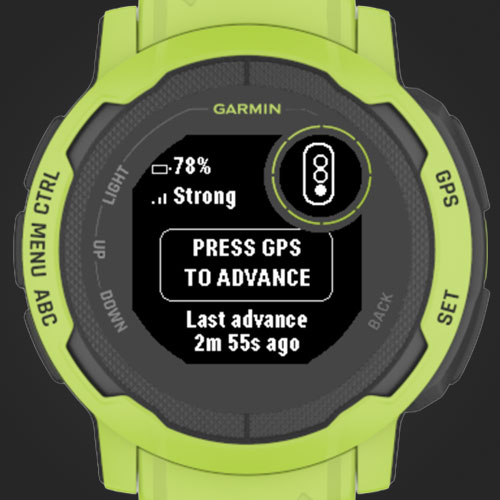
The watch buzzes and shows Advance Confirmed or Advance Failed. Expect about a one-to-two-second round trip — the command hops through Garmin Connect and your phone on its way to the receiver, so it's a touch slower than the phone app itself.
If It's Not Working
- Keep the CommandSignal app open on the phone — the watch needs it running. If the watch says "Open CommandSignal on your phone," that's the fix.
- Confirm Garmin Connect Mobile is installed and the watch is linked in the CommandSignal app.
- Confirm the phone shows
Connectedto the receiver, then reopen the watch app.